ChatGPT vs Flux Kontext 2026: Which is better for you?
If you're still using ChatGPT for architectural image generations, you might be missing out. With the latest version of Flux Kontext released in May 2025, this platform offers even more refined control over materiality, lighting, and design intent.
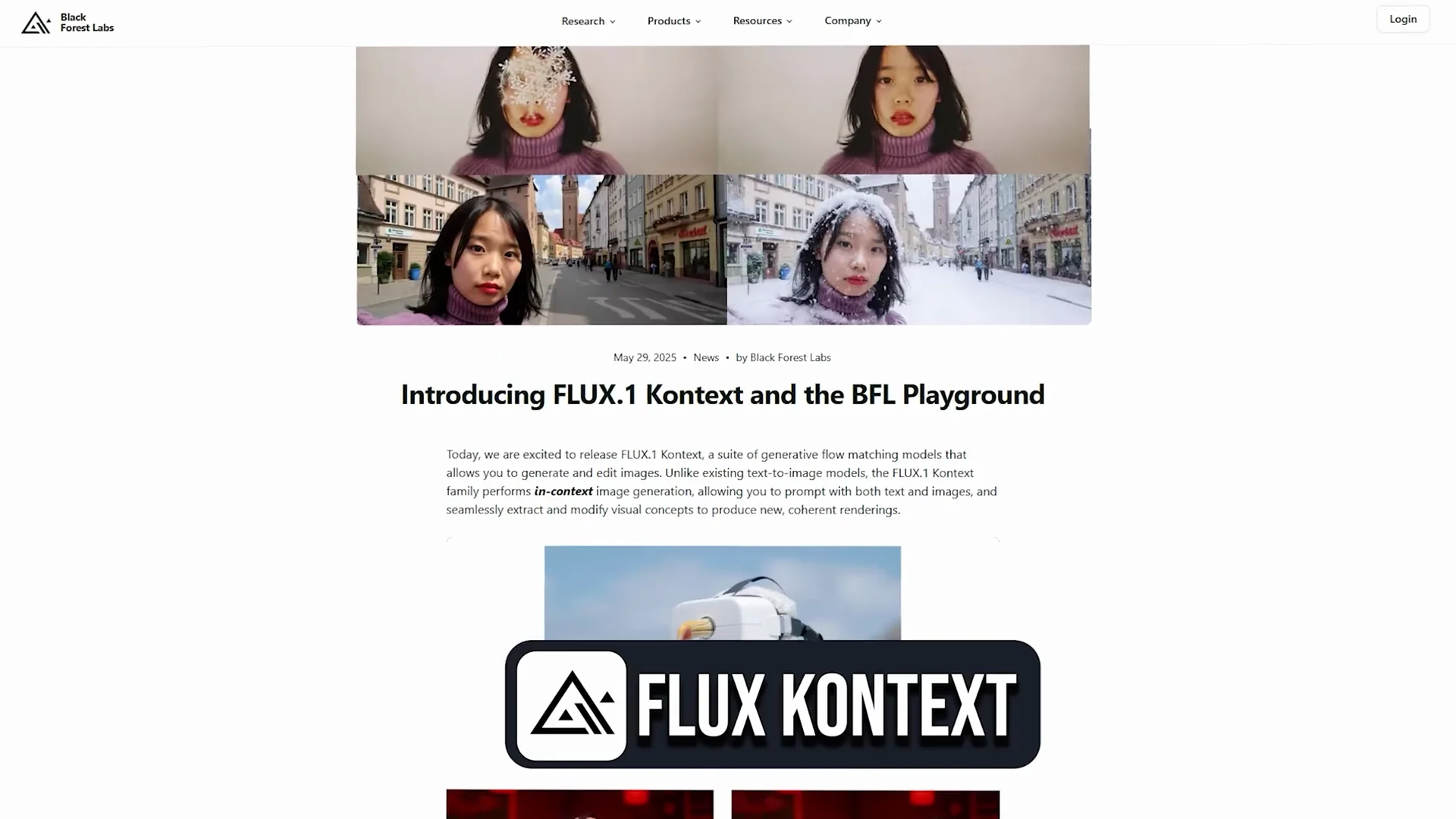
But how does it compare to the versatile image generation capabilities of ChatGPT, especially when it comes to architectural workflows and practical day-to-day scenarios? I will let you decide which platform works better. I'm Salman, an architect and an illustrator. Flux Kontext currently comes with a free trial of 200 image credits. Each image generation will take four credits in the pro mode and eight credits in the max mode.
| Category / Use Case | ChatGPT - Key Notes | Flux Kontext - Key Notes | My Pick |
|---|---|---|---|
| Speed | Takes about 1-2 minutes to generate, depending on complexity and prompt | Creates images in about 10-12 seconds regardless of prompt detail | Flux Kontext |
| Framing and composition | Often tighter framing with the subject in focus | Zoomed-out views that show more context, cinematic compositions | Flux Kontext |
| Materiality and lighting control | Good, but can miss or break materials in spots | Refined control over materiality, lighting, and design intent | Flux Kontext |
| 1) Text to image - A-frame cabin in a forest | Great looking image that uses the prompts well; cabin in focus, trees slightly blurry; nice play of light; roof materials appear broken | Camera is zoomed out with full context; furniture details inside the cabin; more cinematic; architecturally accurate scale, furniture, and openings | Flux Kontext |
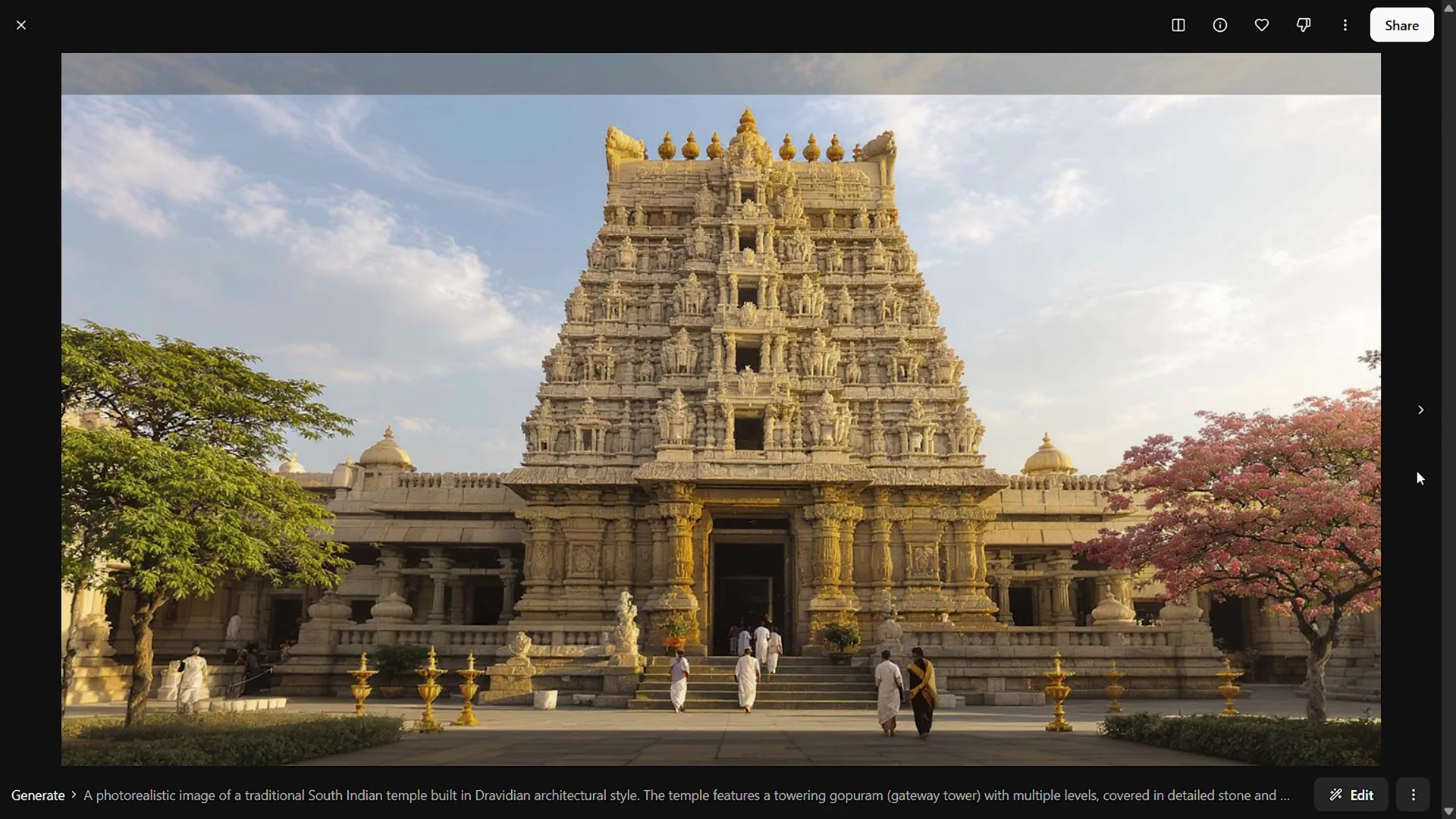
| 2) Cultural or regional context - Dravidian temple | Warm golden lighting highlighting intricate stone textures; culturally accurate figures and clothing; conveys intricacy even without exact sculptures | Grand and dramatic; soft, diffused lighting; strong symmetry and depth; mixes South and North Indian elements like domes not typical for Dravidian; figures feel North Indian | ChatGPT |
| 3) Sketch to realistic | Retains context and surroundings but alters tower proportions and perspective; many horizontal elements changed; would be great if tower elements were retained | Strong, realistic facade elements and scale; detailed surroundings and lively context; stunning compositions, but it does not follow the base sketch | Split - Flux for composition; neither for strict sketch fidelity |
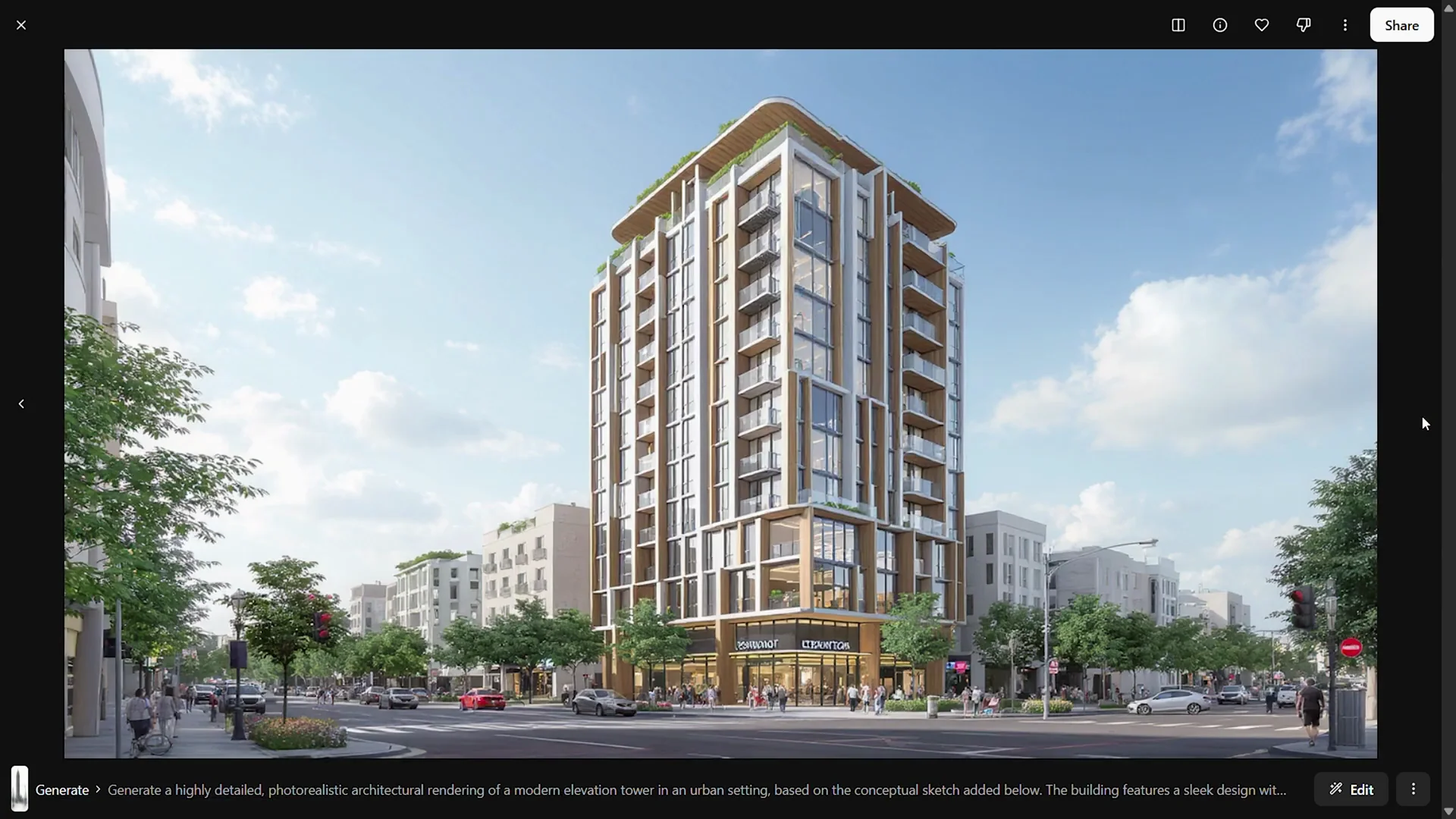
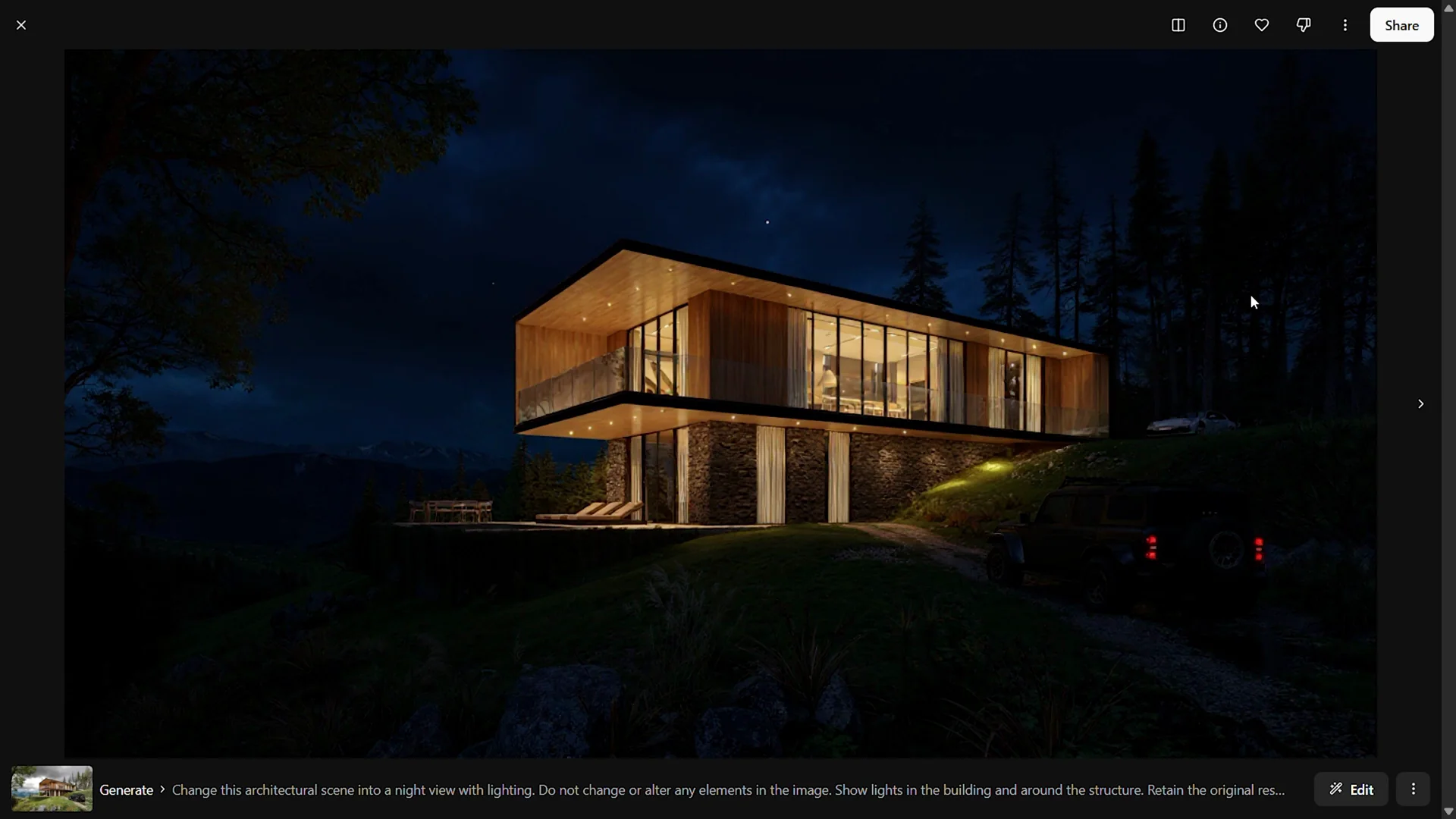
| 4) Change mood/environment - night, rain, snow | Night view adds driveway and car lights; building lit without major element changes. Rainy view has reflective ground and drooping vegetation. Snowfall shows direction across elements | Night feels more dramatic and cinematic with only main structure illuminated. Rain feels more realistic due to overall environment. Snow looks good. Adjusts color temperature and atmosphere for a real, cinematic feel | Flux Kontext |
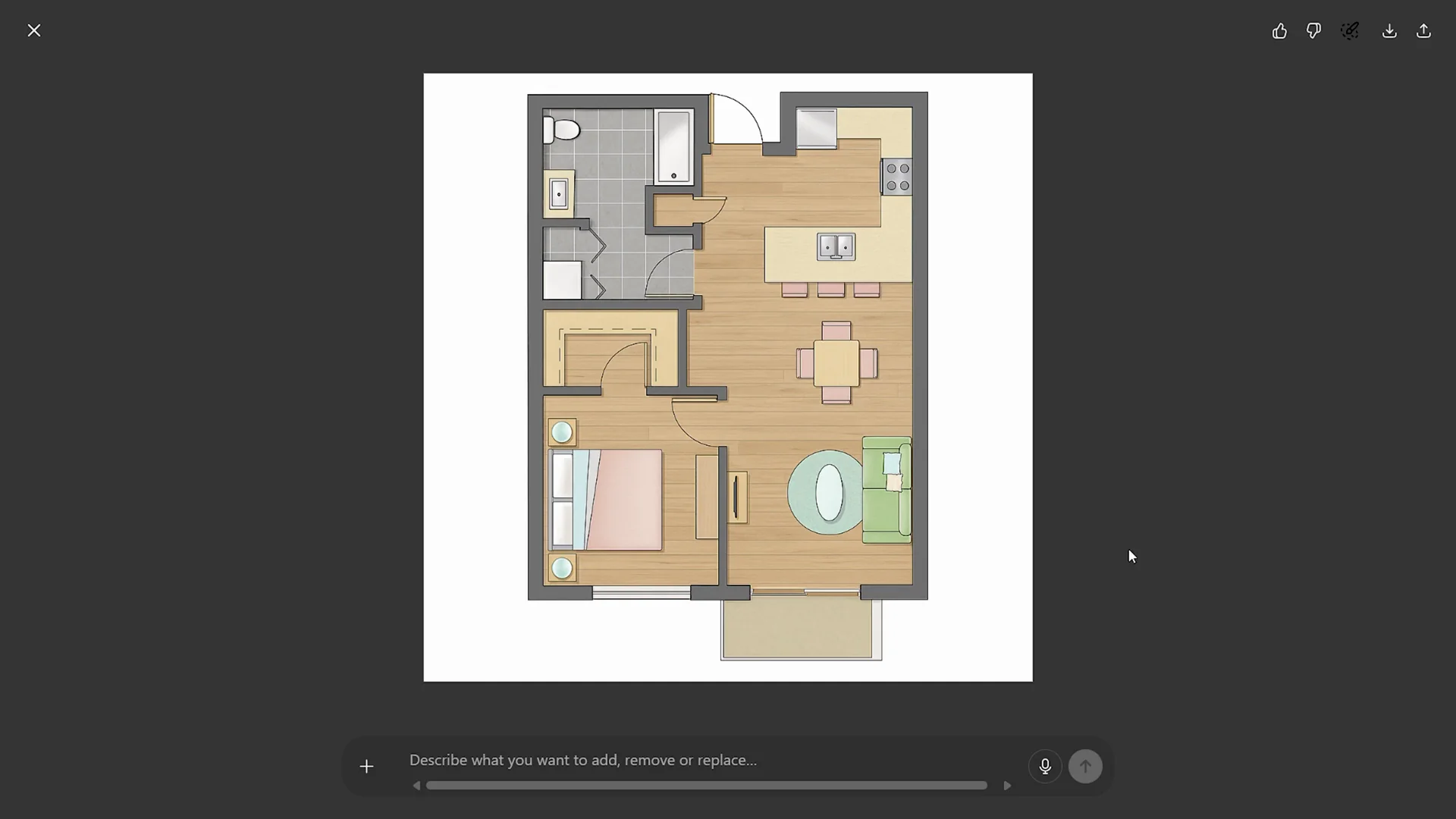
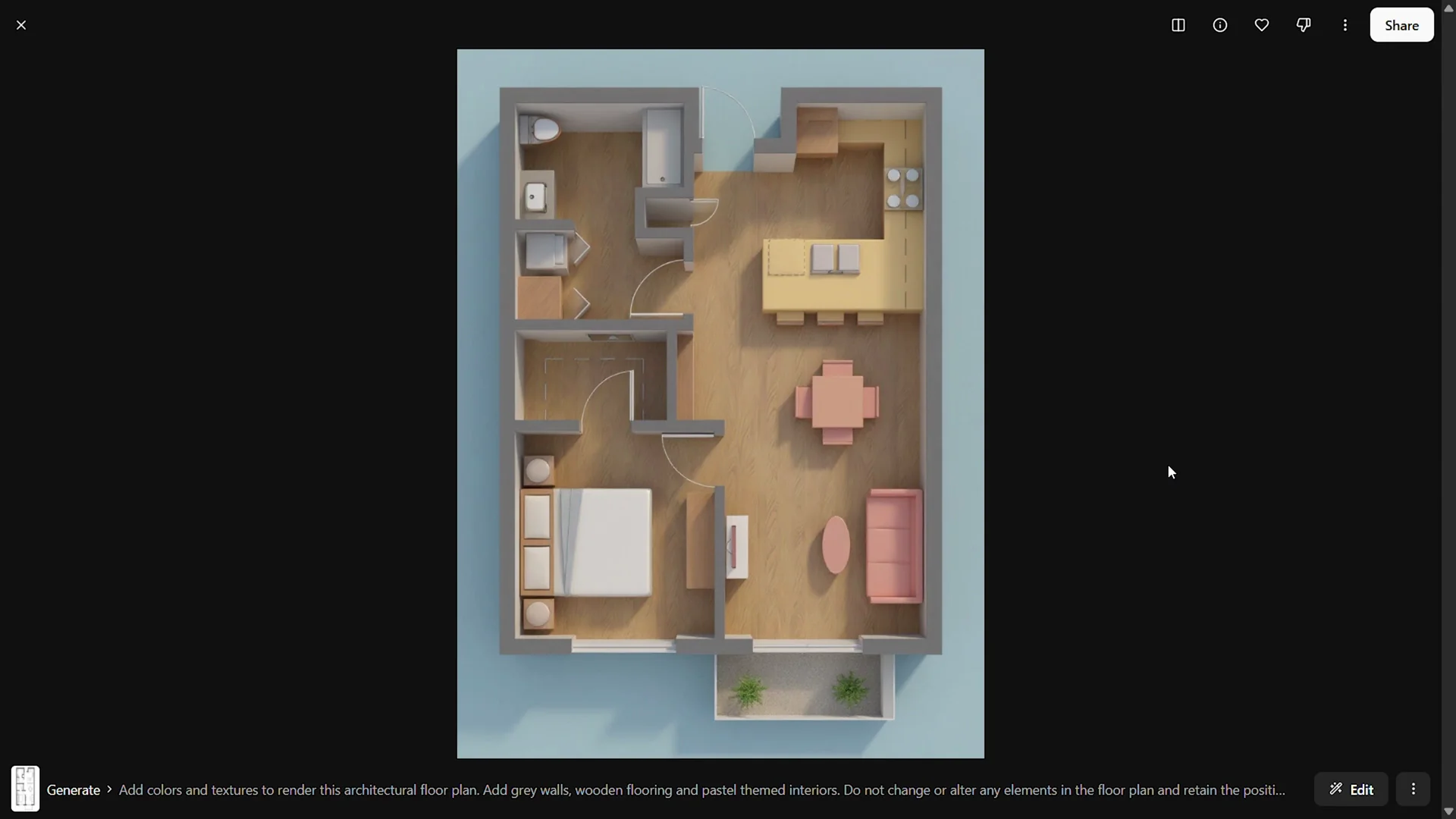
| 5) Floor plan rendering | Maintains 2D quality and accuracy as per drawing; quick, soft pastel colors that are fun and useful on the go | Tends to add depth and perspective, turning 2D plans into 3D interpretations; not exactly prompt-true but opens possibilities | Depends on context - 2D clarity vs 3D reinterpretation |
| 6) Mood board to perspective - master bathroom | Good, but not great; scale and textures are solid, framing and realism feel off; still helpful for quick visualization and can improve with prompt tweaks | Strong composition that conveys space; framing like a 3D render; materials and elements feel better; functionality can be off, but edit tab helps refine | Flux Kontext |
| 7) Remove objects from a scene | Removes overlapping furniture well; textures and colors mostly retained; wall pattern goes missing | Closer to original with wall pattern retained; color temperature and scene feel accurate and realistic | Flux Kontext |
| 8) Change perspective of an image | Eye-level conversion works but object and human scales feel off; still a decent effort | More natural overall; furniture arrangement may be off, but composition and elements add realism and a sense of space | Flux Kontext |
| 9) Material swapping | Realism retained; ceiling, furniture, and backdrop changed per prompt; flooring not updated; materials on furniture look good | Feels more realistic; updates mentioned elements and attempts floor change; greater depth and materiality | Flux Kontext |
| 10) Urban environment context | Interesting conceptual output with a clear axis and hierarchy; mixes building styles from simple blocks to more futuristic forms; a solid conceptual base to iterate | Realistic materials and elements, but the output feels flat against the prompt; reads as a regular housing complex without the futuristic cues | ChatGPT |
| Editing workflow | Can edit and iterate, including specifying non-square outputs to retain resolution | Edit tab to describe changes and regenerate; consistently strong compositions | Tie for edit capability, Flux stronger in composition |
ChatGPT VS Flux - Detailed Comparison Across 10 Architectural Use Cases
1) Text to image - A-frame cabin in a forest
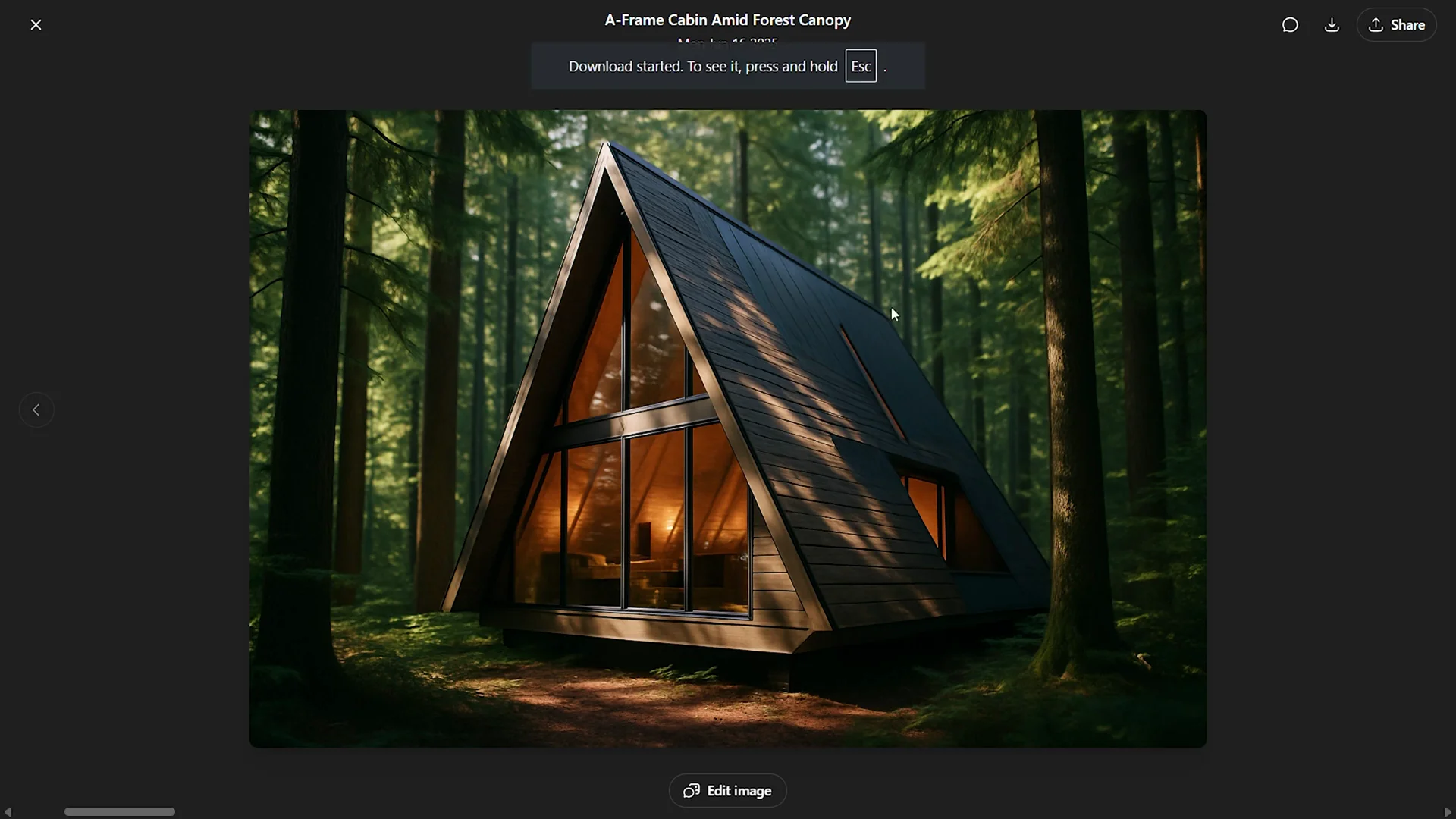
We used the same image prompt in both platforms. ChatGPT takes about a minute or two to generate an image, depending on the complexity and the prompt. The result looks great and uses all the prompts provided. The cabin is in focus and trees on both sides are slightly blurry. I like the play of light, but roof materials appear broken.
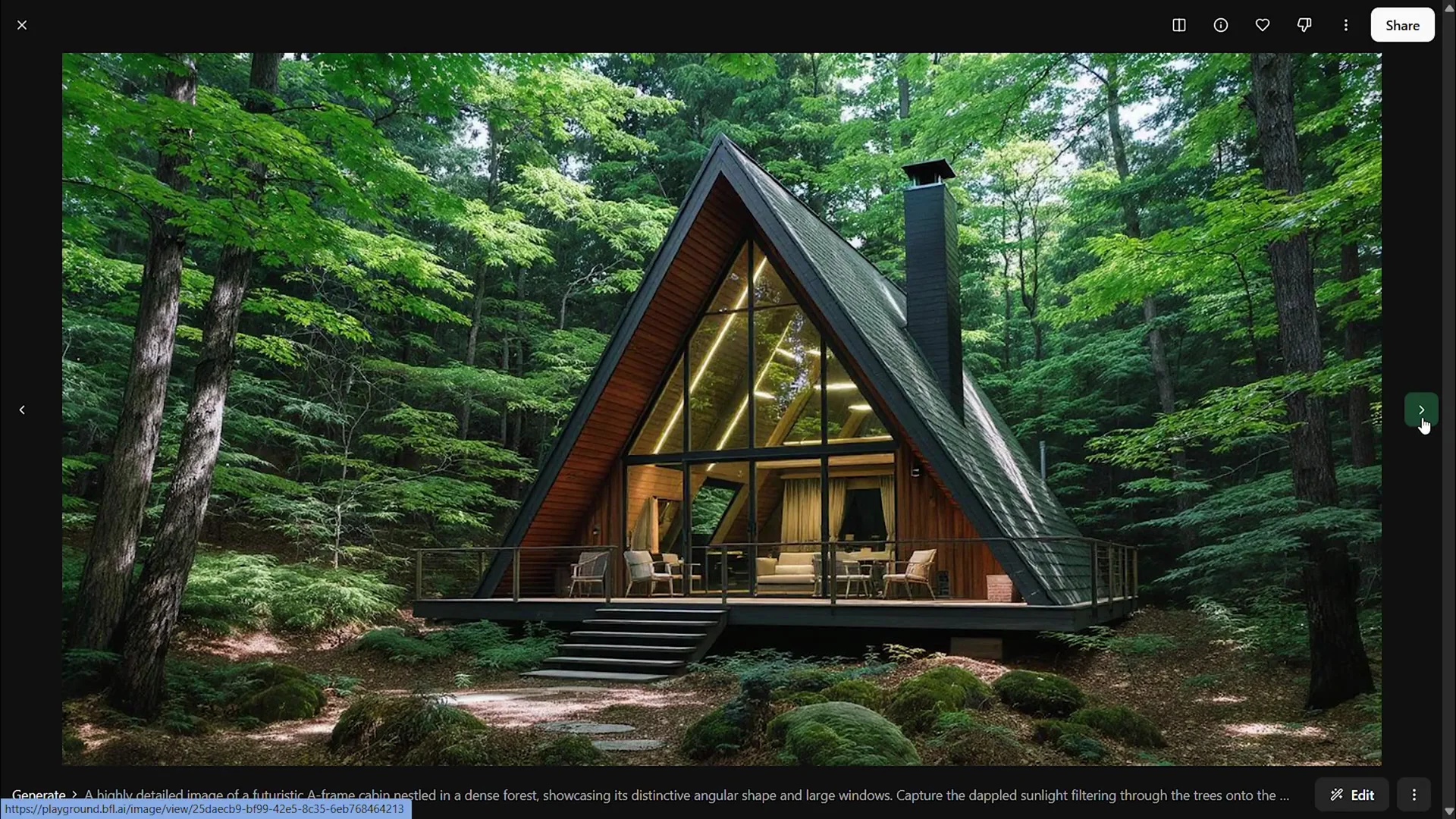
Flux Kontext with the same prompt shifts the composition to a zoomed-out camera that shows the wider environment and the cabin. It shows furniture details inside the cabin that were slightly missing in ChatGPT. It looks more cinematic, like a 3D render in a matching environment, and feels more architecturally accurate in scale, furniture, and openings. My pick here is Flux Kontext.
2) Cultural or regional context - Dravidian temple
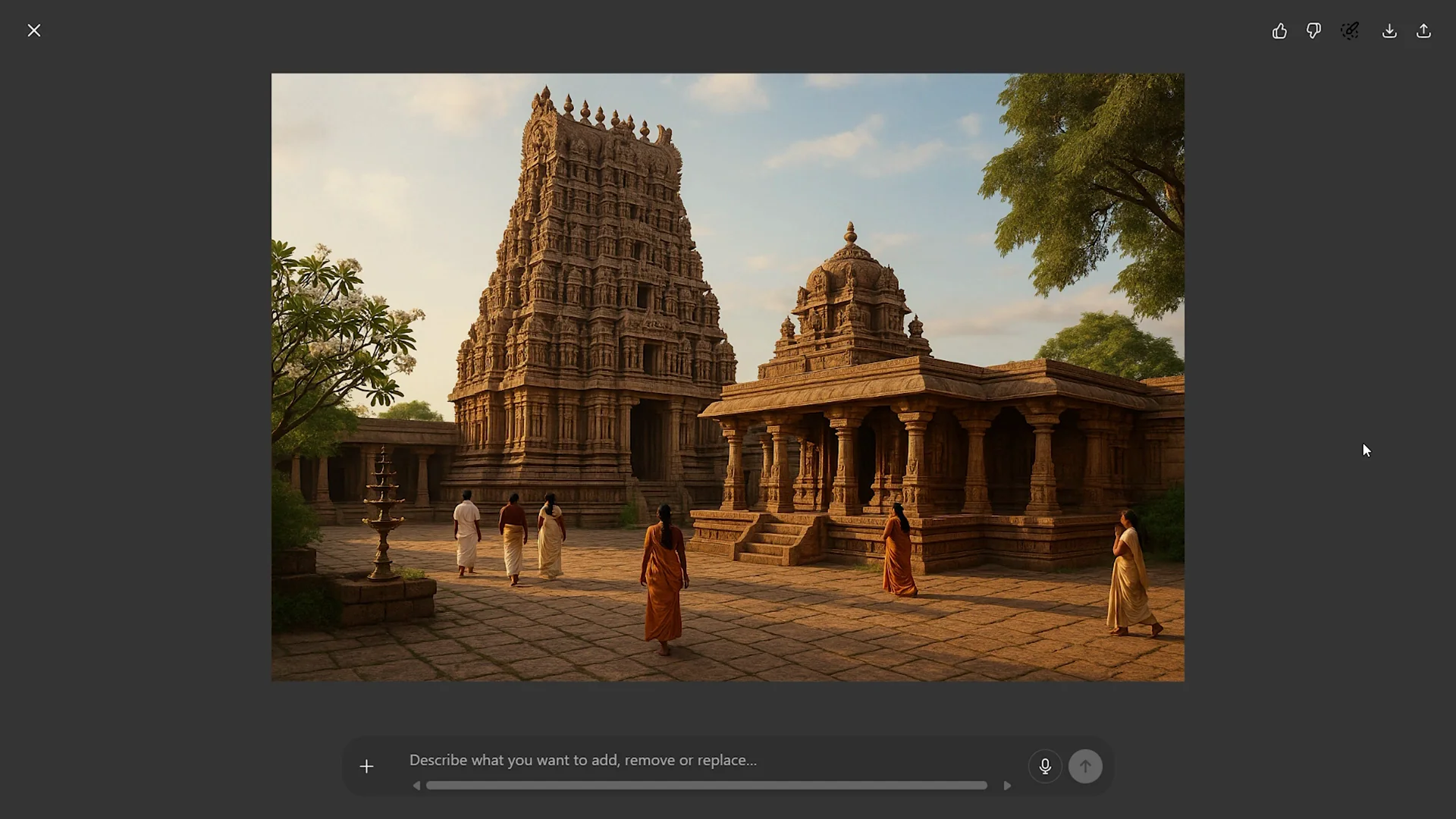
We tested a South Indian temple architecture prompt in the Dravidian style. ChatGPT’s scene recalls real South Indian temples I’ve visited. Warm golden lighting highlights stone textures and suggests intricacy without exact sculptures. Human figures and clothing feel culturally accurate.
Flux Kontext showcases grandeur with softer, diffused lighting and strong symmetry that draws the eye into the courtyard depth. In cultural accuracy, it mixes multiple South Indian styles and adds elements more typical of North India, such as domes, and even the figures feel North Indian. ChatGPT stands out here.
3) Sketch to realistic image
We used a tower sketch. In ChatGPT, the context and surroundings stay true, but the tower loses its vertical presence. The sketch had a three-point perspective while the output looks like two-point, and many horizontal elements are altered. If the tower elements had been retained, it would have been a great image.
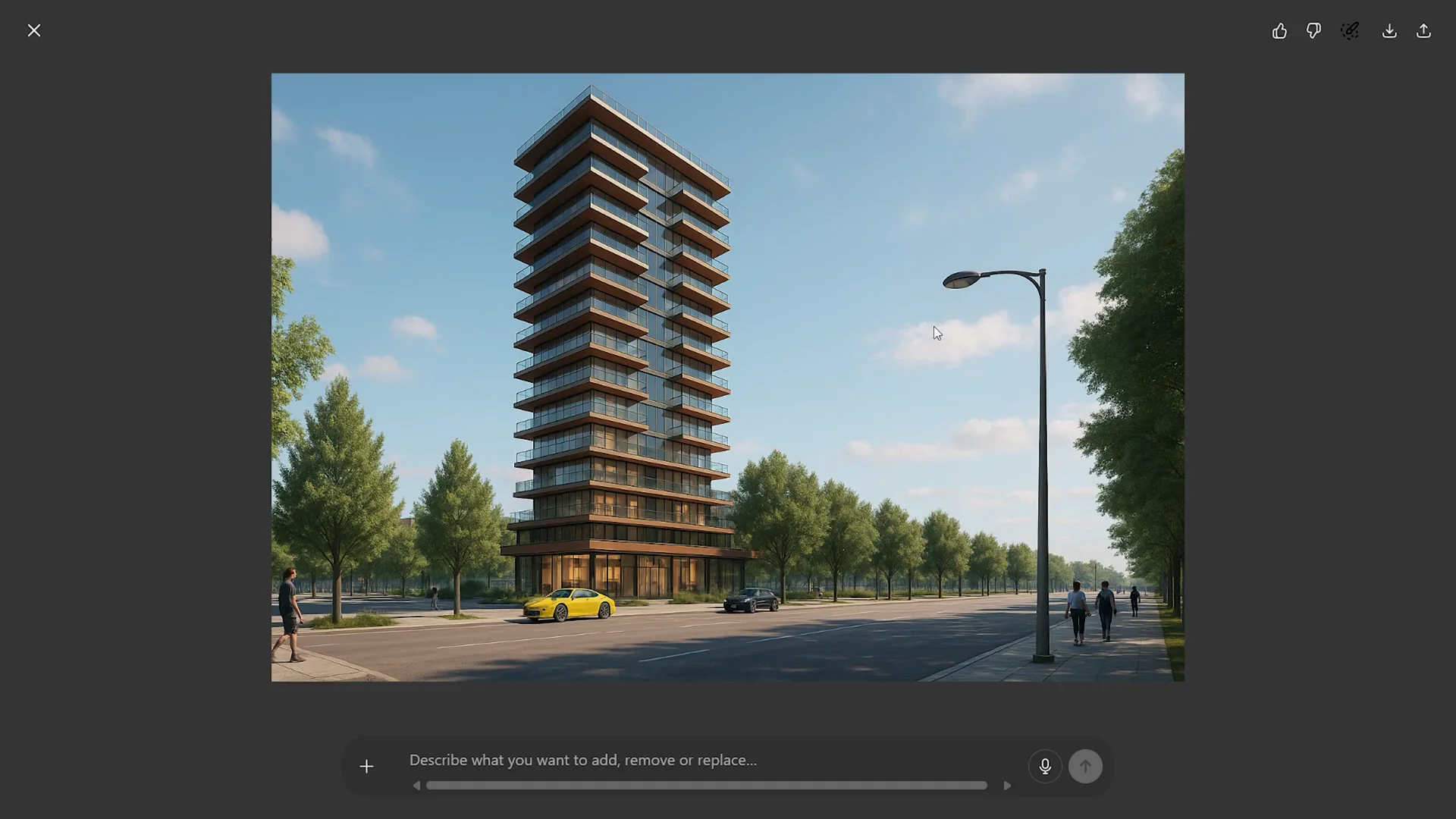
Flux Kontext did not follow the base sketch either, but produced strong, realistic facade elements, better scale, lively street context, detailed surroundings, and stunning composition. It still falls short on sketch fidelity, but for composition and context it stands out.
4) Changing the mood or environment - night, rain, snow
Using a render by Stanislav on Behance, ChatGPT’s night view adds driveway lights and car lights, keeps the structure lit, and preserves most elements. The rainy view shows convincing reflections and vegetation drooping with wetness. The snow view distributes snow directionally across elements.
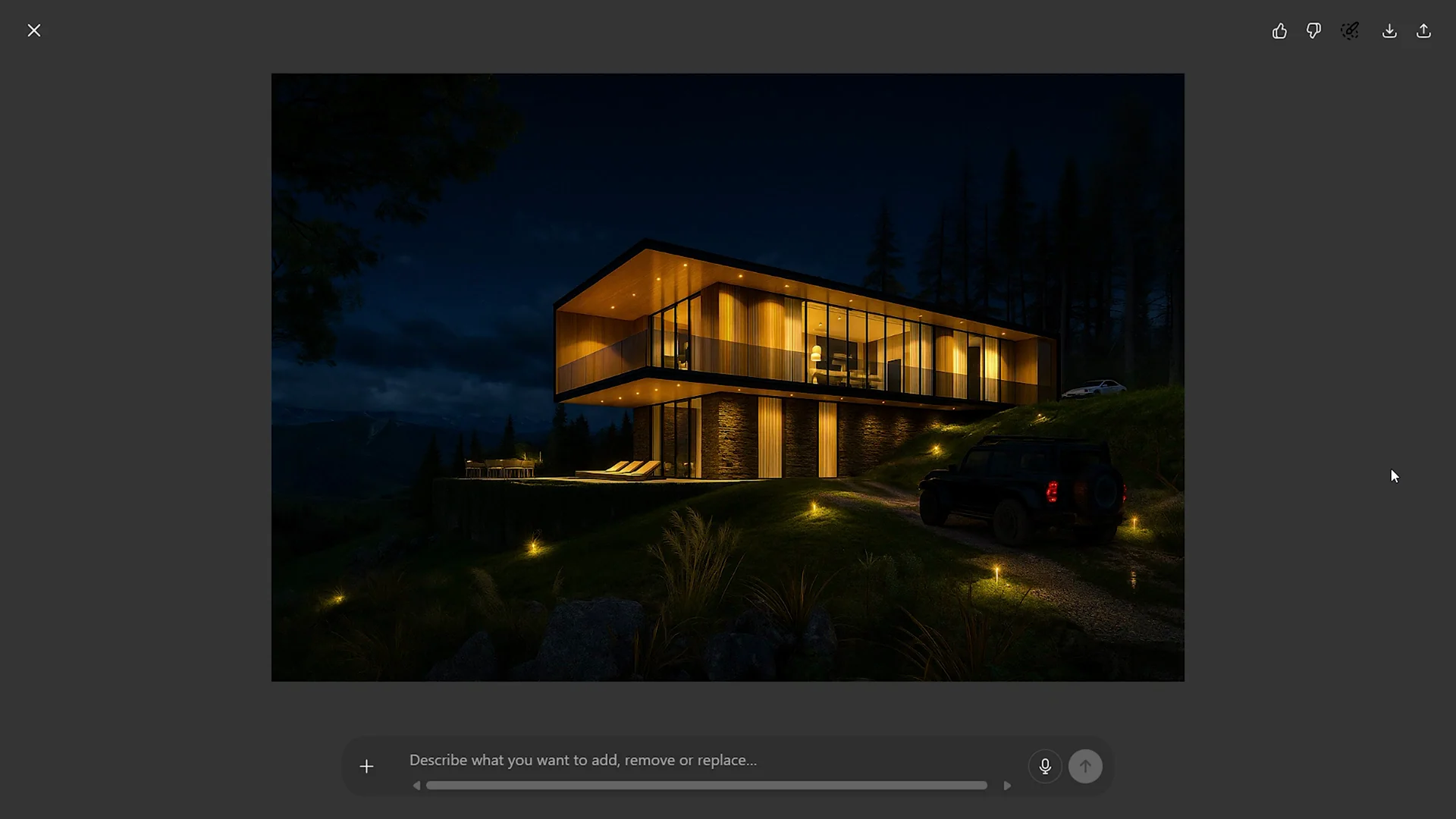
Flux Kontext’s night output is more dramatic and cinematic and keeps illumination focused on the main structure. The rainy view feels more realistic, likely due to overall environmental realism. Snow also looks strong. Flux Kontext adjusts color temperature and atmosphere so the output reads more real and cinematic. Both perform well, but my pick is Flux Kontext.
5) Floor plan rendering
In ChatGPT, the simple floor plan stays accurate to the drawing. The output reads as a quick, fun 2D rendering with soft pastel colors and is ideal for adding color on the go.
Flux Kontext tends to add depth and convert plans to perspective, effectively turning a 2D floor plan into a 3D interpretation. It’s not exactly the prompt, but it opens possibilities by assigning heights to elements. For larger floor plans, ChatGPT maintains a 2D quality, while Flux Kontext reinterprets more in 3D. It depends on the context you are using it in.
6) Mood board to perspective - master bathroom
Using a Pinterest mood board, ChatGPT’s result looks good but not great. Scale and textures work, but framing and realism feel off. It is still useful for quick visualization and can improve with prompt refinement.
Flux Kontext, in 10-12 seconds, delivers compositions that read like solid 3D renders. You get a sense of space and elements. Functionality can be off at times, but composition, materials, and elements feel far better than the ChatGPT output. The edit tab lets you describe changes and regenerate. You can do this in ChatGPT too, but it falls short in how elements come together. My pick is Flux Kontext.
7) Removing objects from a scene
On an image of a cafe corner, ChatGPT removes overlapping furniture cleanly and retains textures and colors with only slight alteration, but loses the wall pattern.
Flux Kontext keeps the wall pattern, keeps the color temperature true, and reads more realistic overall. Flux Kontext outshines here.
8) Changing the perspective of an image
From an aerial view of cafe seating, we asked for an eye-level view with people. ChatGPT’s output works but has scale issues for objects and humans. It’s still a good effort at view conversion.
Flux Kontext looks more natural. Furniture placement may still be off, but composition and elements add realism and convey space. Flux Kontext takes the lead.
9) Material swapping
On an actual project image, we changed the ceiling and furniture to red and the wooden backdrop to a stone textured beige paneling. ChatGPT keeps realism and updates the elements, except for the flooring. Material quality on furniture is retained.
Flux Kontext feels more realistic, updates the listed elements, and attempts to change the floor texture. The added depth and materiality make it stronger. Flux Kontext stands out.
10) Urban environment context
On an empty site, the prompt asks for a housing complex. ChatGPT produces an interesting result with a clear axis and hierarchy. It mixes building styles from simple blocks to more futuristic multi-level forms. It reads as a conceptual image you could refine further.
Flux Kontext looks realistic in materials and elements, but the output feels flat against the prompt and looks like a regular housing complex without the futuristic elements. My assumption is that Flux Kontext uses actual images from the internet to create these generations, whereas ChatGPT blends multiple images based on the prompt. Here, the obvious choice is ChatGPT.
Features Breakdown - ChatGPT VS Flux
ChatGPT - Features
- Text-to-image with prompts, typically 1-2 minutes per generation based on complexity.
- Can change mood and environment convincingly, adding contextual cues like driveway and car lights, rain reflections, and directional snow.
- Maintains 2D qualities for floor plans with decent accuracy to drawings.
- Edits and iterations supported, including prompts to retain original resolution to avoid square defaults.
- Strong at conceptual urban compositions with clear axes and hierarchical arrangements.
- Cultural and regional prompts can be accurate in atmosphere, attire, and texture cues.
Flux Kontext - Features
- Fast generation at about 10-12 seconds across varied prompts and details.
- Consistently cinematic compositions with zoomed-out context and attention to spatial framing.
- Refined control of materiality, lighting, and design intent.
- Interface allows prompt input, model selection, and adjustable image settings; supports an edit tab to describe changes and regenerate.
- Often interprets 2D plans as 3D, adding depth and scale across elements.
- Strong realism in rainy and snowy environments and in material swapping tasks; frequently adjusts global color temperature and atmosphere for a cohesive result.
Pros and Cons - ChatGPT
Pros
- Good fidelity to 2D drawings for floor plans.
- Solid cultural accuracy for Dravidian temple prompts, including human attire and atmospheric lighting.
- Effective mood and environment changes with believable lighting cues and reflections.
- Useful conceptual outputs for urban contexts with clear axis and hierarchy.
Cons
- Can break or misinterpret materials, such as roof shingles.
- Struggles with perspective and proportion when translating sketches or changing viewpoints.
- Composition and framing can feel off in room-scale interiors.
- May default to square images unless prompted to retain resolution.
- Object removal can miss subtle textures or patterns.
Pros and Cons - Flux Kontext
Pros
- Very fast generation across use cases.
- Strong, cinematic compositions that read like 3D renders.
- Realistic materiality and lighting that elevate rain, snow, and night scenes.
- Often more architecturally accurate in scale, furniture, and openings.
- Edits via an integrated edit tab that regenerate coherent scenes.
- Converts 2D plans into 3D interpretations that can inspire further development.
Cons
- Can drift from base sketches and prompts, especially for strict plan or sketch fidelity.
- Cultural accuracy may mix styles and introduce elements from other regions.
- Floor plan rendering may not stay 2D and prompt-true.
- Urban context prompts can turn generic against futuristic or specific cues.
Where Each Option Excels - ChatGPT VS Flux
ChatGPT - Best-fit Scenarios
- Cultural or region-specific architecture where attire and atmosphere matter.
- Floor plan color-ups or quick 2D renderings where drawing accuracy is key.
- Conceptual urban massing with clear axes and hierarchical compositions.
- Environment changes that add pragmatic lighting cues and reflections.
Flux Kontext - Best-fit Scenarios
- Text-to-image with strong context, framing, and architectural scale.
- Mood changes to night, rain, and snow with cohesive atmosphere and color temperature.
- Mood board to interior perspective where composition and materials drive the scene.
- Object removal that preserves small textures and original color temperature.
- Perspective changes that need a natural sense of space and believable composition.
- Material swapping that benefits from depth and richer material read.
- Plan-to-3D reinterpretations that open up possibilities.
Final Conclusion - ChatGPT VS Flux
ChatGPT and Flux Kontext each push architectural visualization forward, but they shine in different areas. ChatGPT performs well when cultural accuracy, 2D plan fidelity, and conceptual urban organization matter. Flux Kontext consistently delivers cinematic compositions with realistic materiality and lighting, faster outputs, and stronger edits that keep scenes coherent.
If you value speed, composition, and realistic atmosphere, Flux Kontext is the stronger daily driver for images, mood changes, object edits, material swaps, and perspective shifts. If your task hinges on cultural specificity, 2D plan accuracy, or early-stage urban concepts with clear axes and hierarchy, ChatGPT stands out. Both have strengths and weaknesses, and one might be better than the other depending on the context you are using it in. As these tools continue to evolve, the way we visualize architecture becomes faster, intuitive, and a lot more creative.
Recent Posts

How to use Grok 2.0 Image Generator?
Learn how to access Grok 2.0’s AI image generator (Premium required), write better prompts, and avoid pitfalls like real people and brands. Step-by-step tips.
How to use Instagram AI Image Generator?
Use Meta AI in Instagram DMs to turn text into images—and even animate them. It’s free, fast, and built in. No external apps needed; create art right in chat.
Leonardo AI 2026 Beginner’s Guide: Create Stunning Images Fast
Learn Leonardo AI step by step—sign up, explore Home, and generate or enhance photos with free, powerful tools. A quick, clear starter for beginners.